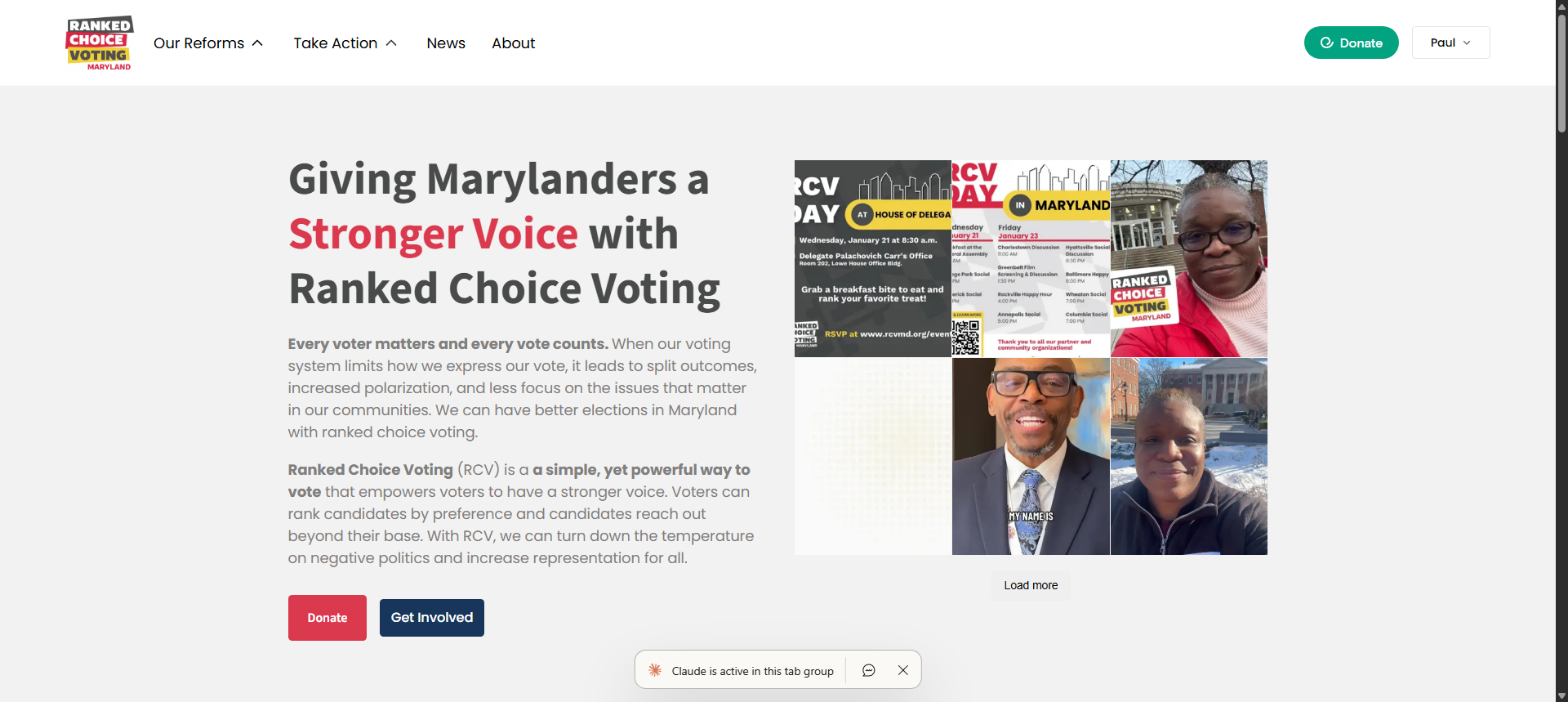
Project Overview: What RCVMD Needed and Why WordPress Was the Right Call
Ranked Choice Voting Maryland (RCVMD) is a nonprofit advocacy organization working to implement ranked choice voting across the state. When they came to me, they needed more than a brochure site. They needed a platform that could handle civic engagement campaigns, event management with RSVP tracking, volunteer coordination across multiple teams, deep CRM integration with NationBuilder, and content publishing managed by non-technical staff and volunteers.
A page builder or off-the-shelf theme wasn't going to cut it. The CRM integration alone required custom server-side logic that no drag-and-drop tool could handle. The event system needed custom post types, filterable listings, recurring event support, and automatic tagging in an external CRM. The role-based dashboard system needed four distinct experiences for different user types. This was a custom WordPress build from the ground up.
The project ran roughly six months, from September 2025 through March 2026, with 128 commits to the private GitHub repo. The final site includes 35 published posts, 42 pages, 18 custom block templates, 16 modular PHP includes, a bespoke must-use plugin for NationBuilder integration, and 4 custom block patterns.
How the Theme Architecture Works: Full Site Editing Done Right
The site runs on WordPress 6.9 using Full Site Editing (FSE), WordPress's block-based approach to building entire page layouts, not just post content. FSE replaces the old PHP template hierarchy with HTML-based block templates that non-developers can modify through the Site Editor. I built a custom child theme on top of Twenty Twenty-Five, WordPress's default FSE theme.
The design system lives entirely in theme.json, a single configuration file that acts as the source of truth for every color, font, spacing value, and layout constraint across the site. Every design token becomes a CSS custom property. For example, var(--wp--preset--color--cerise-red) maps to the brand's primary red. There are zero hardcoded hex values anywhere in the theme. If the client wants to change their brand red, they change one value in theme.json and it propagates everywhere.
The color palette was mapped directly from the client's Figma designs. Cerise Red (#DB394E) is the primary brand color used for CTAs and key actions. Saffron (#f3d245), a warm gold, handles accents and highlights. Cape Cod grays provide the structural foundation. Typography uses Source Sans 3 for headings and Poppins for body text, both loaded from Google Fonts with display=swap for performance. The type scale uses fluid typography, so font sizes scale smoothly between mobile and desktop breakpoints rather than jumping at fixed media queries.
The theme includes 18 block templates covering every page type: front-page, single events, event archives, staff dashboard, team dashboard, volunteer dashboard, partner dashboard, and more. Each template is composed of reusable block patterns, which are predefined block arrangements that volunteers can insert into pages without knowing HTML or CSS. I created 4 custom block patterns for common layouts the team uses repeatedly.
Modular Component Architecture: 16 Self-Contained PHP Modules
The theme's includes/ directory contains 16 self-contained PHP modules. Each follows a strict naming convention (rcvmd-*.php) and has its own paired CSS and JS files in assets/css/ and assets/js/. This modular approach means any component can be updated, debugged, or replaced without touching anything else in the system.
How the Events System Works
The events system is the most complex component. It spans four PHP modules: rcvmd-events-list-block.php for the custom Gutenberg block that renders dynamic event listings, rcvmd-event-rsvp.php for RSVP handling via shortcodes, rcvmd-recurring-events-helper.php for recurring event support, and rcvmd-events-url-structure.php for clean URL structures on the custom events post type.
Events are a custom post type with Advanced Custom Fields (ACF) for structured data: location, Maryland county, event type, online meeting link, contact information, and registration links. The custom Gutenberg block in blocks/events-list/ renders a filterable list where users can filter by county or date and toggle between list and calendar views. Recurring events use the ACF RRule Field plugin and a custom helper that generates individual event instances from recurrence rules.
The single event template handles display logic intelligently: it detects whether an event has an online link, a physical location, or both, and adjusts the layout accordingly. Past events automatically display differently from upcoming ones, and the RSVP form disappears after an event has passed.
Social Sharing, Video Modals, and Newsletter Integration
rcvmd-social-share.php provides custom social share buttons without loading any third-party scripts or trackers. rcvmd-video-modal.php implements a lightweight modal system for embedded video content using vanilla JS with no jQuery dependency. Newsletter signups are handled by rcvmd-email-form.php and rcvmd-wpforms-newsletter.php, which integrate WPForms submissions with NationBuilder through the mu-plugin (more on that below).
Community Spotlight: Featuring Supporter Voices
rcvmd-community-spotlight.php creates a custom post type for supporter testimonials and endorsements. These appear on the homepage as the "Community Voices" section, giving real people a platform to explain why ranked choice voting matters to them. The component handles its own query, layout, and responsive behavior.
Automatic Schema Markup for SEO
rcvmd-schema-markup.php automatically injects JSON-LD structured data based on content type. Events get Event schema with proper date, location, and organizer fields. Articles get Article schema with author and publisher information. This structured data helps search engines understand the content and display rich results, such as event dates in search listings and article bylines in Google News.
Why the NationBuilder Integration Uses a Must-Use Plugin
The NationBuilder integration is the star of the build. The site uses WP Fusion Lite as the CRM bridge, but the free version has limited automation capabilities and doesn't cover RSVP tagging, auto-login workflows, or the bidirectional syncing that RCVMD's operations require. So I built a custom NationBuilder connector as a must-use plugin (mu-plugin). In WordPress, a mu-plugin lives in wp-content/mu-plugins/ instead of the regular plugins directory. The key difference: mu-plugins are always active, cannot be accidentally deactivated through the admin panel, and load before regular plugins. For a CRM integration that the entire site depends on, having someone accidentally deactivate it would break critical workflows. Making it a mu-plugin eliminates that risk. The RCVMD NationBuilder mu-plugin contains its own includes directory with 12 PHP files.
How the API Client and RSVP Handler Work
api-client.php handles all REST API communication with NationBuilder's API, including authentication, request formatting, response parsing, error handling, and rate limit management. rsvp-handler.php is where the RSVP magic happens. When a user submits an RSVP through WPForms, the handler uses the specific form ID to auto-generate a unique event tag in the format "RSVP - {Event Name} - {YYYY-MM-DD}", applies that tag to the contact in NationBuilder via WP Fusion, stores the RSVP data in WordPress user meta, and shows an "Already RSVP'd" message on subsequent visits. The user never sees any of this complexity. They click a button and they're registered.
Newsletter, Google Groups, and Data Sync
newsletter-handler.php routes newsletter signups from WPForms through to NationBuilder as tagged contacts. google-groups-sync.php syncs volunteer group memberships to Google Groups. When someone is added to a volunteer team in NationBuilder, they automatically get added to the corresponding Google Group for team communication. event-host-autofill.php automatically populates event host fields from NationBuilder contact data, saving staff from manually entering the same information repeatedly. sync-processor.php handles bidirectional data synchronization between WordPress and NationBuilder.
Supporting Architecture: Config, Logging, and Error Handling
The remaining files provide the foundation: repository.php for data access patterns, config.php for centralized configuration, settings.php for admin-facing settings pages, logging.php for structured logging that makes debugging production issues possible, error-handler.php for graceful failure handling, and acf-fields.php for registering the ACF fields needed for NationBuilder-specific event metadata.
How the Auto-Login System Works
NationBuilder email campaigns can include links like https://rcvmd.org/events/event-slug/?cid={{recipient.id}} that contain the recipient's NationBuilder contact ID. When someone clicks one of these links, the system automatically logs them into WordPress via WP Fusion, pre-fills RSVP forms with their name and email, and bypasses WP Super Cache for those requests using custom cache exclusion rules defined in both PHP and .htaccess. The result: a supporter gets an email about an upcoming event, clicks the link, and lands on the event page already logged in with the RSVP form pre-filled. One click to register. This kind of seamless experience is what makes the CRM integration worth the engineering effort.
How Role-Based Dashboards Serve Different Users
The RCVMD site implements four distinct dashboard experiences, each as a custom page template. The Staff Dashboard (page-staff-dashboard.php) serves the Executive Director and Deputy Director with full organizational oversight, including content metrics, event performance, volunteer activity, and CRM sync status. The Team Lead Dashboard (page-team-dashboard.php) gives volunteer team leads, including the tech team lead, tools for team management and coordination.
The Volunteer Editor Dashboard (page-volunteer-dashboard.php) provides a streamlined content management interface for volunteer content editors. They see only what they need to create and edit posts, without the complexity of the full WordPress admin. The Coalition Partner Dashboard (page-partner-dashboard.php) is the most interesting: it allows external partner organizations to create and manage their own events on the RCVMD website, giving coalition partners a stake in the platform while keeping everything under one roof.
User Role Editor manages the granular capabilities for each role: which post types they can edit, which admin menu items they see, and which dashboard widgets appear. Ultimate Member handles registration and profile management. Together, they create four genuinely different experiences within the same WordPress installation.
What Plugins Power the Site and Why Each Was Chosen
Every plugin in the stack earns its place. Yoast SEO handles on-page SEO with XML sitemaps and schema markup. WP Super Cache provides full-page caching with smart exclusion rules for dynamic content like auto-login URLs and RSVP forms. Wordfence handles security; the dashboard shows blocked attacks from multiple countries, which is expected for a politically-oriented nonprofit site.
WP Fusion Lite provides the base CRM bridge to NationBuilder, but its free version has limited automation capabilities. The custom mu-plugin extends that foundation with RSVP tagging, auto-login workflows, newsletter routing, volunteer management, and bidirectional contact syncing. WPForms handles all form submissions, including RSVPs, newsletter signups, and contact forms. Advanced Custom Fields provides the structured content fields for events and other custom post types. Site Kit connects Google Analytics and Search Console for traffic monitoring.
ShortPixel and Converter for Media handle image optimization, automatically converting uploads to WebP and AVIF formats. UpdraftPlus manages automated backups. WP Accessibility adds accessibility improvements on top of the semantic HTML and WCAG-compliant contrast ratios already built into the theme. User Role Editor and Ultimate Member handle the role-based access system described above.
How Accessibility and Performance Are Handled
Accessibility isn't an afterthought; it's built into the architecture. The theme uses semantic HTML throughout: nav, main, article, and section elements give screen readers meaningful structure. Keyboard navigation works across all interactive elements. WCAG-compliant color contrast ratios are enforced through theme.json. The design tokens themselves guarantee compliance, so individual templates can't accidentally break accessibility.
The WP Accessibility plugin adds skip links, landmark labels, and other enhancements. The mobile-first responsive design uses fluid typography that scales smoothly rather than jumping at breakpoints. The image optimization pipeline, ShortPixel for compression plus automatic WebP and AVIF conversion, keeps page weights down without manual intervention. WP Super Cache handles full-page caching, with smart exclusion rules that prevent caching of personalized pages like auto-login URLs and RSVP confirmations.
Lessons Learned Building for a Nonprofit
The biggest lesson from this project is that the best CRM integrations are invisible. Supporters don't know about NationBuilder tags, WP Fusion syncs, or bidirectional data flows. They click a link in an email, land on an event page already logged in, hit one button to RSVP, and get a confirmation. Everything else happens silently in the background. The engineering complexity exists so that the user experience can be simple. The AI-assisted workflow that made a 6-month build like this possible is described in the two-agent workflow: coding AI and browser AI together — the same pattern I used for testing visual layout and WordPress admin changes throughout this project.
The modular architecture proved its value repeatedly during the six-month build. When requirements for the events system changed mid-project, I could rewrite rcvmd-event-rsvp.php without touching the event listing block, the recurring events helper, or the URL structure module. Each component has a clear boundary and a defined interface. This isn't just good engineering practice. It's essential when building for an organization where priorities shift as legislative sessions progress and advocacy campaigns evolve.
Full Site Editing combined with well-defined block patterns turned out to be the right bet for empowering non-technical volunteers. The content team can create new pages using the block patterns I built, adjust layouts in the Site Editor, and publish content without touching code. They don't need to call me for routine content updates, which is exactly how it should work.
I'm also the volunteer tech team lead for RCVMD, which means I use the Team Lead Dashboard daily. Dogfooding the system, using the tools I built, has been invaluable for catching usability issues and refining the interface based on real daily use rather than hypothetical user stories.
Tech Stack Summary
- CMS: WordPress 6.9 with Full Site Editing
- Theme: Custom child theme on Twenty Twenty-Five
- Server: PHP 7.2+, MySQL 8.0, Nginx
- Design System: theme.json with CSS custom properties, Figma-to-token color mapping
- Typography: Source Sans 3 (headings), Poppins (body) via Google Fonts with display=swap
- CRM: NationBuilder via bespoke mu-plugin (12 PHP modules)
- CRM Bridge: WP Fusion Lite (event syncing) + custom NationBuilder mu-plugin (RSVPs, newsletters, volunteer management, contact syncing)
- Forms: WPForms
- Custom Fields: Advanced Custom Fields with RRule Field plugin
- SEO: Yoast SEO, custom JSON-LD schema markup module
- Caching: WP Super Cache with dynamic content exclusion rules
- Security: Wordfence
- Image Optimization: ShortPixel, Converter for Media (WebP/AVIF)
- Backups: UpdraftPlus
- Analytics: Google Analytics via Site Kit
- Accessibility: WP Accessibility plugin, semantic HTML, WCAG-enforced contrast via theme.json
- User Management: User Role Editor, Ultimate Member
- Architecture: 18 block templates, 16 modular PHP includes, 4 custom block patterns, 4 role-based dashboards
If you're building a WordPress platform for a nonprofit or advocacy organization and need deep CRM integration, modular architecture, and a system that non-technical staff can actually manage, let's talk about your project. You can also explore my WordPress development services or get started with a free consultation.
Building a website for a small business? I also build professional WordPress and Webflow sites for small businesses, starting at $1,000. If you or someone you know needs a site, check out my services or get in touch.
Your digital website sherpa: practical web tips for small businesses, straight to your inbox
Join the Digital Website Sherpa newsletter. No spam, just practical, actionable advice to help you grow your business online. Unsubscribe anytime.
Paul Mulligan
Freelance Web Developer
Paul Mulligan is a freelance web developer based in Baltimore, MD with 10+ years of experience building WordPress and Webflow sites for small businesses. He focuses on clean design, fast performance, and real results.
Support My Open Source Work
I build free, open-source developer tools like Flavian and Aurelius. If you find my work helpful, consider supporting me on Patreon.
Support on PatreonRelated Articles
The Two-Agent Workflow: Coding AI + Browser AI for WordPress
Read ArticleClaude Code for WordPress Debugging: My Workflow
Read ArticleWordPress vs Webflow 2025: Honest Comparison
Read ArticleReady to Transform Your Business's Website?
Let's discuss how I can create a website that attracts and converts more customers.
Get a Free Consultation